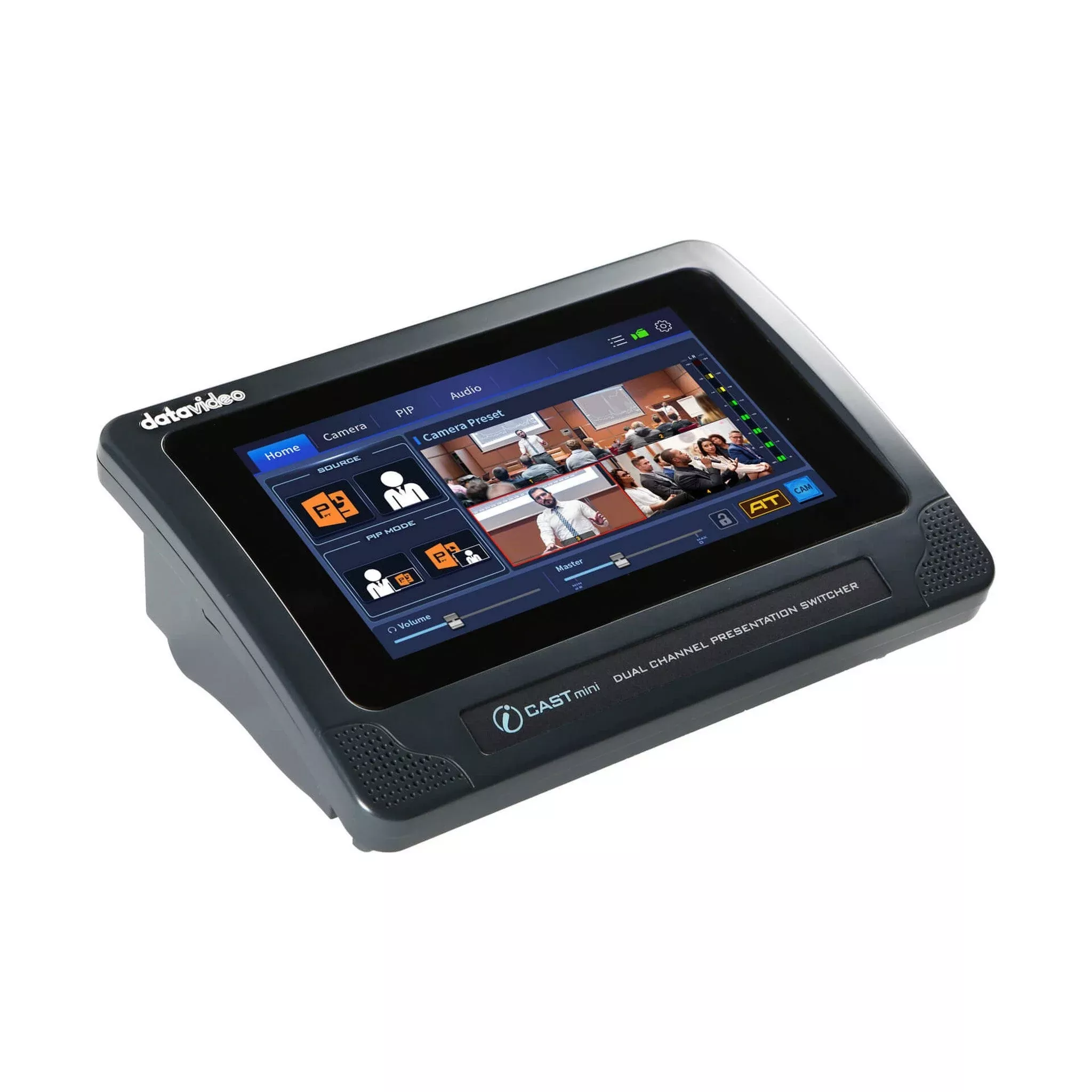
Datavideo iCast Mini 4K Dual Channel Presentation Switcher
Datavideo’s iCAST mini is a multimedia device designed forsingle-operator applications. From small scale corporate training sessions tomid-sized hybrid classrooms or conference halls, the iCAST mini is the perfectfit for your online presentation needs.
The iCAST mini is a newly innovative one-to-one, one-to-manyand hybrid (online/offline) video productions. With the one-button-one-functionfeature on a unique and easy to use touch panel control, even novice users willbe able to easily operate this device.
You don’t need to learn complicated technologies about videoproduction or hire a professional production team. You can take control of yourown presentations with the iCAST mini.
Simply connect the power and the video sources, then leavethe rest to the iCAST mini.
One USB Type C cable to merge online and offline teaching
The most widely used platforms for hybrid classrooms areZOOM, Microsoft Teams, and Google Meet.
The iCAST mini is able to deliver the video along with theaudio to the above-mentioned platforms via the UVC interface with a USB type Ccable. You don’t need to install drivers or perform any calibrations and extradevice configuration. The iCAST mini allows you to stream footage from theclassroom as well as the teaching materials to various locations so thatstudents on the other end of the network will be able to learn in an engagingonline classroom.
Graphical User Interface on Touch Panel
An intuitive graphical user interface on a 7-inch touchpanel with an anti-fingerprint protection provides you with the best colorscreen view at any angles and operation experience.
Videos and PIP Mode
Switch rapidly between your presentation and the camerainput or overlay a PIP window on the program video. You can also swap betweenthe program out video and the PIP image, thereby enhancing the quality of yourpresentation.
Images for key icons for easier identification
Using a real image as your key icon allows you tointuitively identify the camera view that is saved in the key. You can capturecamera images and save them as thumbnail files which are in turn applied toicons of shortcut keys on the home screen.
You can use these images as the icons for all four camerapresets so that by simply pressing these preset keys, you will be able toreturn the camera to the pre-saved position from the current view.
With these still images as the icons, you don’t have torecall what has been saved in the presets. By simply looking at these realimages, you will be able to easily identify the saved PTZ settings.
Graphic icon for keys to simplify workflow
Sometimes there is only a slight difference between theimages so, you can use the device’s built-in graphical icons for betteridentification. We’ve pre-saved hundreds of these icons on the device andcompared to textual icons, they are more appropriate and intuitive.
Image Key + Graphic Key
Of course, these graphical icons can co-exist with the imageicons. They not only simplify your workflow but also reduce the number oferrors. They make your operation faster and easier each time.
PTZ Cameras with Auto Tracking
Datavideo’s PTC-145/285 Smart PTZ cameras allow you toswitch between full body, half body and close up shots. Once the smart trackingfunction takes over, the camera will be able to more precisely determine theappropriate shots for your video production job.
Using non PTZ cameras
When using the iCAST mini with Datavideo’s BC-15P or othernon PTZ cameras, you can hide the camera presets on the UI and simply display panelsthat allow you to switch between camera images and presentation contents whichcan be swapped with PIP images. In this way, the keys are enlarged tofacilitate operations.
Pan, tilt and zoom the smart camera
A PID driven algorithm is able to adjust the pan, tilt andzoom tracks and speeds according to movements of the tracked object, thusmimicking smooth human operation of the lens and avoiding sudden accelerationor halt of the lens motion.
Camera Control
Using an Ethernet cable, you will be able to controlDatavideo’s PTC camera series via the RS-232/422 or DVIP interface, such as panand tilt settings, image size, brightness, contrast, etc, making sure that thecameras always generate high quality images.
Technical Specifications
Video Standard
4K & HD
Video Format
Input
3840x2160p: 30/29.97/25/24/23.98
1080p: 60/59.94/50/30/29.97/25/24/23.98
1080i: 60/59.94/50, 720p: 60/59.94/50
525i59.94 NTSC, 625i50 PAL
Output
HDMI
3840x2160p: 30/29.97/25
1080p: 60/59.94/50/30/29.97/25/24/23.98
UVC
3840x2160p: 30/29.97/25
1080p60/59.94/50/30/29.97/25
720p60/59.94/50
Video Processing
4K, 2K/30 4:4:4, 8bit
Video Input
2 x HDMI 1.4
Computer Graphic Interface
2 via HDMI
Video Output
1 x HDMI 1.4
1 x USB 3.0 Type C (UVC)
Down-converted Output
Yes
Analogue Audio Input
2 x 3 Pin XLR / 1/4” (6.3mm) Combo Socket
Analogue Audio Output
1 x Stereo RCA set (L/R)
1 x Stereo headphone
Digital Embedded Audio Support
Input 2 channels, Output 2 channels
Audio Delay Calibration
Up to 170ms
A+V Switching
Yes
Picture in Picture
1
Camera Control
DVIP/ RS-422/ RS-232
Built-in Audio Mixer
Yes
Firmware Update
USB
Special Features
7” Touchscreen Display
Chassis
Unibody
Dimension (LxWxH)
220 x 154 x 75mm
Weight
1.1 kg
Power
DC 12V 18.7W
Operating Temp. Range
0~40 Degrees C
What’s in the Box
1 x iCast MINI product
1 x AD Switch DC 12V with AC Cord
![Victory Garden [LP] (Seed Paper Card)](https://www.guitarstringmarket.com/wp-content/uploads/2026/10/victory-garden-lp-seed-paper-card.webp)


![N.O. Hits At All Vol. 10 [CD]](https://www.guitarstringmarket.com/wp-content/uploads/2026/10/n-o-hits-at-all-vol-10-cd.webp)